
Build and edit
spreadsheets with AI

SheetPal is a spreadsheet editor with a built-in AI assistant. Edit cells yourself or ask AI to create, edit, and analyze your spreadsheets.

Free trial · No credit card needed.

Data entry

“Extract the contacts from these PDFs and add them to my contact sheet.”

contacts-east.pdfcontacts-west.pdf
NameEmailPhone
Maya Patelmaya@example.com(202) 555-0142
Jordan Ellisjordan@example.com(202) 555-0186

Charts

“Show monthly sales by channel in a stacked column chart.”
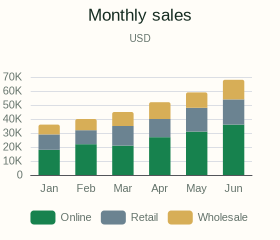
SheetPal stacked column chart comparing monthly Online, Retail, and Wholesale sales from January through June.

Pivot tables

“Create a pivot table of revenue by region and product.”

SheetPal pivot table with Region, Product A, Product B, and Grand Total columns, totaling $124,000.

Complex formulas

“Calculate tiered commissions: 5% up to $25k, 8% up to $50k, then 12%.”

SheetPal sales commission formulas: Ava earns $900 on $18,000 sales, Noah $2,450 on $40,000, Mia $5,050 on $65,000, and Leo $8,290 on $92,000.
=ROUND(MIN(B2,25000)*5%+MAX(MIN(B2-25000,25000),0)*8%+MAX(B2-50000,0)*12%,2)

Conditional formatting

“Highlight unpaid invoices: yellow for 1–7 days overdue, red after 7.”

SheetPal invoice cells with unpaid invoices 12 days overdue highlighted red and 4 days overdue highlighted yellow. Paid and upcoming invoices are unhighlighted.

Data cleaning

“Remove duplicate contacts by email, trim extra spaces, and tidy up names.”

Before
Three contact rows: Ava Chen and Noah Reed with inconsistent capitalization and extra spaces, plus a duplicate Ava email address.
After
Two unique contacts, Ava Chen and Noah Reed, with cleaned names and the duplicate email removed.

Plays well with Excel and Google Sheets.

Import Excel or CSV files. Export to Excel or Google Sheets.

Try SheetPal free

Build your next spreadsheet.

Start from scratch or choose a template.

Try SheetPal freeBrowse templates

Free trial · No credit card needed.