
A spreadsheet editor with AI built in.
SheetPal is a spreadsheet editor that runs in your browser. Edit your workbook directly, or ask AI to build it, make changes and analyze the result.
Import Excel or CSV files. Export to Excel or Google Sheets.
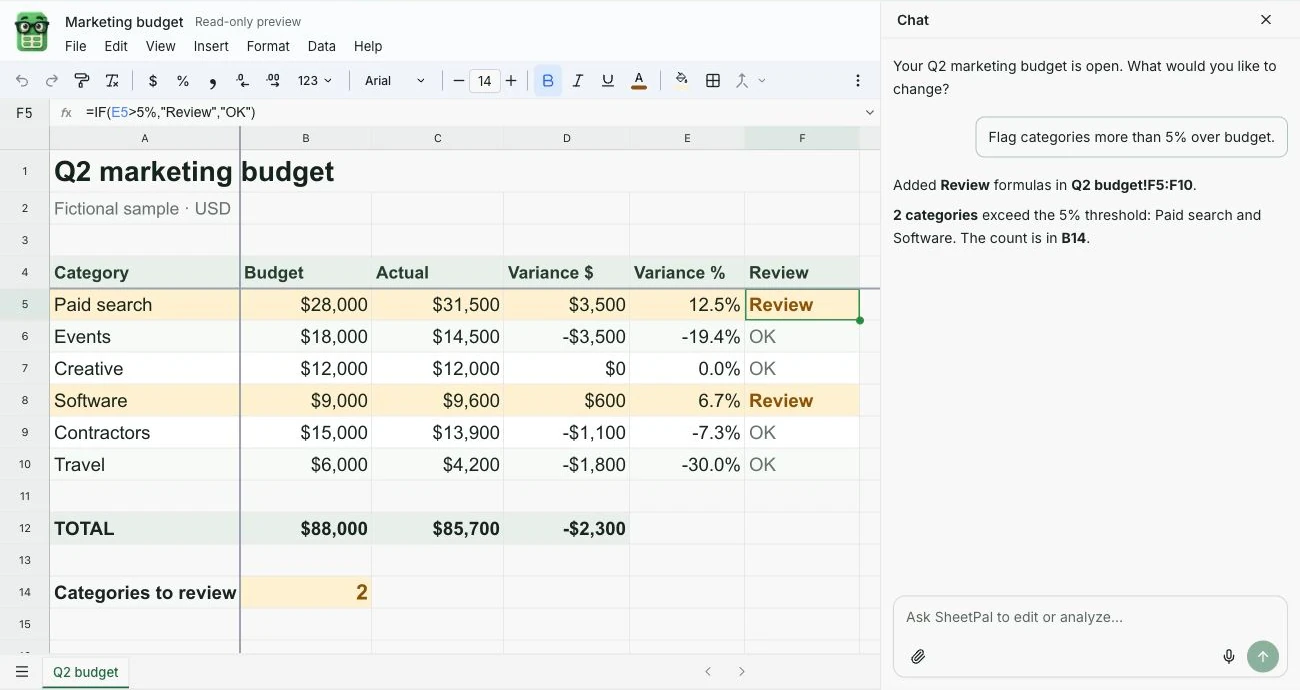
Flag categories more than 5% over budget.
| Category | Variance | Review |
|---|---|---|
| Paid search | 12.5% | Review |
| Software | 6.7% | Review |
2 categories exceed the 5% threshold.
Edit your spreadsheet directly.
Enter data, write formulas, format cells and work with tables, charts and pivot tables. You can edit your workbook yourself, ask AI for a change, or switch between the two.
=C5-B5| Category | Budget | Actual | Variance |
|---|---|---|---|
| Paid search | $28,000 | $31,500 | Selected cell D5: $3,500 |
| Events | $18,000 | $14,500 | -$3,500 |
| Creative | $12,000 | $12,000 | $0 |
| Software | $9,000 | $9,600 | $600 |
| Contractors | $15,000 | $13,900 | -$1,100 |
| Travel | $6,000 | $4,200 | -$1,800 |
| Total | $88,000 | $85,700 | -$2,300 |
Ask AI to build or change a spreadsheet.
Set up tabs, tables, formulas and formatting, or ask for a change to an existing workbook. Inspect a formula, edit cells yourself, undo a change, or ask for a follow-up.
Flag categories more than 5% over budget.
| Category | Variance | Review |
|---|---|---|
| Paid search | 12.5% | Review |
| Events | -19.4% | OK |
| Creative | 0.0% | OK |
| Software | 6.7% | Review |
| Contractors | -7.3% | OK |
| Travel | -30.0% | OK |
2 categories exceed the 5% threshold.
Compare budget with actual spend.
Compare numbers, flag exceptions and add charts or pivots to explore the result. Here, total spend is under budget, but two categories still need a closer look.
Budget vs. actual
USD- Total budget
- $88,000
- Actual spend
- $85,700
- Under budget
- $2,300
Import and export.
Can I use my existing spreadsheet?
Yes. Import an Excel .xlsx or CSV file, then ask SheetPal to make changes or answer questions about its data. Your original file stays separate.
Sign in to import. Files can be up to 50 MB, subject to workbook limits. Review compatibility warnings and check important values against the original.
Get help importing a fileCan I take the result elsewhere?
Download an .xlsx workbook copy or create a new Google Sheets file in a connected Google account.
These are separate copies, without continuous synchronization. Some features can change during export; read compatibility messages and check the destination file.
Get help exporting a fileWhat else should I know?
Is SheetPal a browser extension or an Excel or Google Sheets add-in?
SheetPal is a separate spreadsheet editor that runs in your browser. No extension or add-in is needed. Import Excel or CSV files, work in SheetPal, then export a copy to Excel or Google Sheets.
Do I need an account?
You can preview a blank workbook first. Sign in to edit, import files, save your work and use AI. You choose when to send a request.
How should I check the result?
AI can make mistakes. Inspect important formulas, source values and totals before relying on the result. You can correct cells directly or ask for another change.
What happens to my data when I use AI?
When you use AI, your prompt and relevant spreadsheet content are sent to OpenAI or OpenRouter, depending on the model. We don’t use your content to train our own AI models. Read the data-handling details.
Bring your next spreadsheet task.
Sign in, open a workbook and describe what you need, or import your file.